Shift Report
The Shift report tracks a user’s activities throughout their shift, from the start to the end. It includes details such as the drawer used at the beginning of the shift, the shift start and end times, opening and closing balances, debit and credit amounts, expected and actual cash drops, and any variances.
Perform the following steps to generate the report:
Navigate to Reports ➜ Dynamic Reports ➜ Front Desk ➜ Shift report.
Refer to the following table and fill in the fields.
|
Field |
Description |
|---|---|
|
Report Name |
Shift. |
|
Property |
This is a mandatory multi-select drop-down list that displays the current property by default. Users can select the preferred properties for report generation. |
|
Start Date |
The start date for report generation. This is a mandatory field that displays the current property date by default. Users can select any date in the past up to the current property date. Future dates cannot be selected. |
|
Cashiers |
This is an optional multi-select drop-down list that allows users to select the cashiers to be included in the report. |
|
Payment Methods |
This is an optional multi-select drop-down list that allows users to select the payment methods to be included in the report. |
|
Include Direct Bill Settlements |
Select this checkbox to include the direct bill settlements made by the cashiers. |
Click Run to generate the report.
Click Save to save the report under User Favorites section.
Sample Report
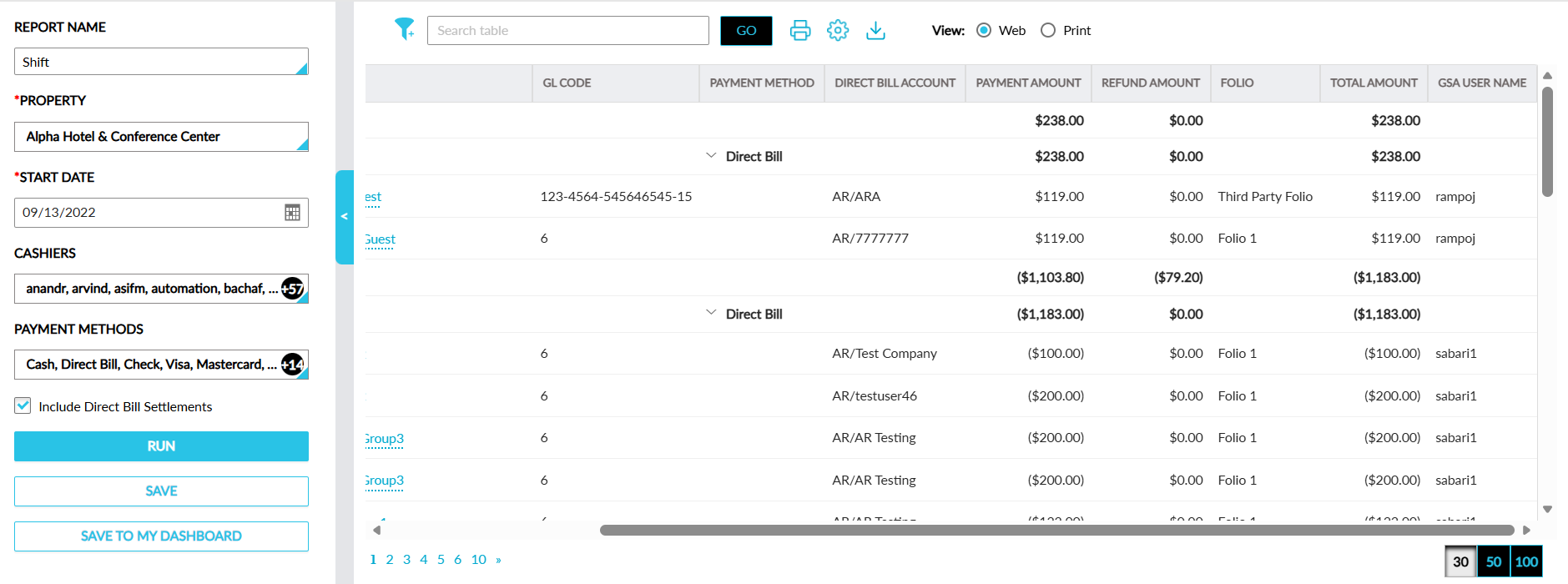
Report Fields
This report displays the following fields:
|
Field |
Description |
|---|---|
|
Cashier |
Each of the selected cashiers is displayed with an accordion. When the accordion is expanded, the activities performed by the cashier during their shift is displayed. This column can be filtered. |
|
Account |
The account type and account number from which the transaction is recorded is displayed as a hyperlink. When clicked, users are redirected to the respective account. |
|
Name |
The name of the guest profile from the account where the transaction is recorded. |
|
GL Code |
The GL code of the payment method used. This column can be filtered. |
|
Payment Method |
The name of the payment method used for the transaction. This column can be filtered. |
|
Direct Bill Account |
The A/R account to which the transacted amount is transferred. This column can be filtered. |
|
Expiration Date |
The expiry date of the card used for transaction. This column is left blank for cash and direct bill settlements. |
|
Card Details |
The card details of the credit card payment method used. |
|
Card Subtype |
The card subtype configured for the credit card payment method. This column can be filtered. |
|
Reference Number |
The reference number entered when performing the transaction. |
|
Payment Amount |
The payment amount of the transaction. |
|
Refund Amount |
The amount refunded for a transaction. |
|
Folio |
The name of the folio in which the transaction was performed. This column can be filtered. |
|
Total Amount |
The final amount after the refund. |
|
GSA User Name |
The username of the cashier who made the payment. This column can be filtered. |